How to Create a Flipkart Affiliate Link (2026) — Earnko Link Generator + Tracking Guide
If you’re sharing Flipkart product links on WhatsApp, Telegram, Instagram, YouTube, or a blog, you should use a Flipkart affiliate link (not a normal product URL). Normal URLs often don’t carry attribution data, which can lead to missed tracking and missed commission.
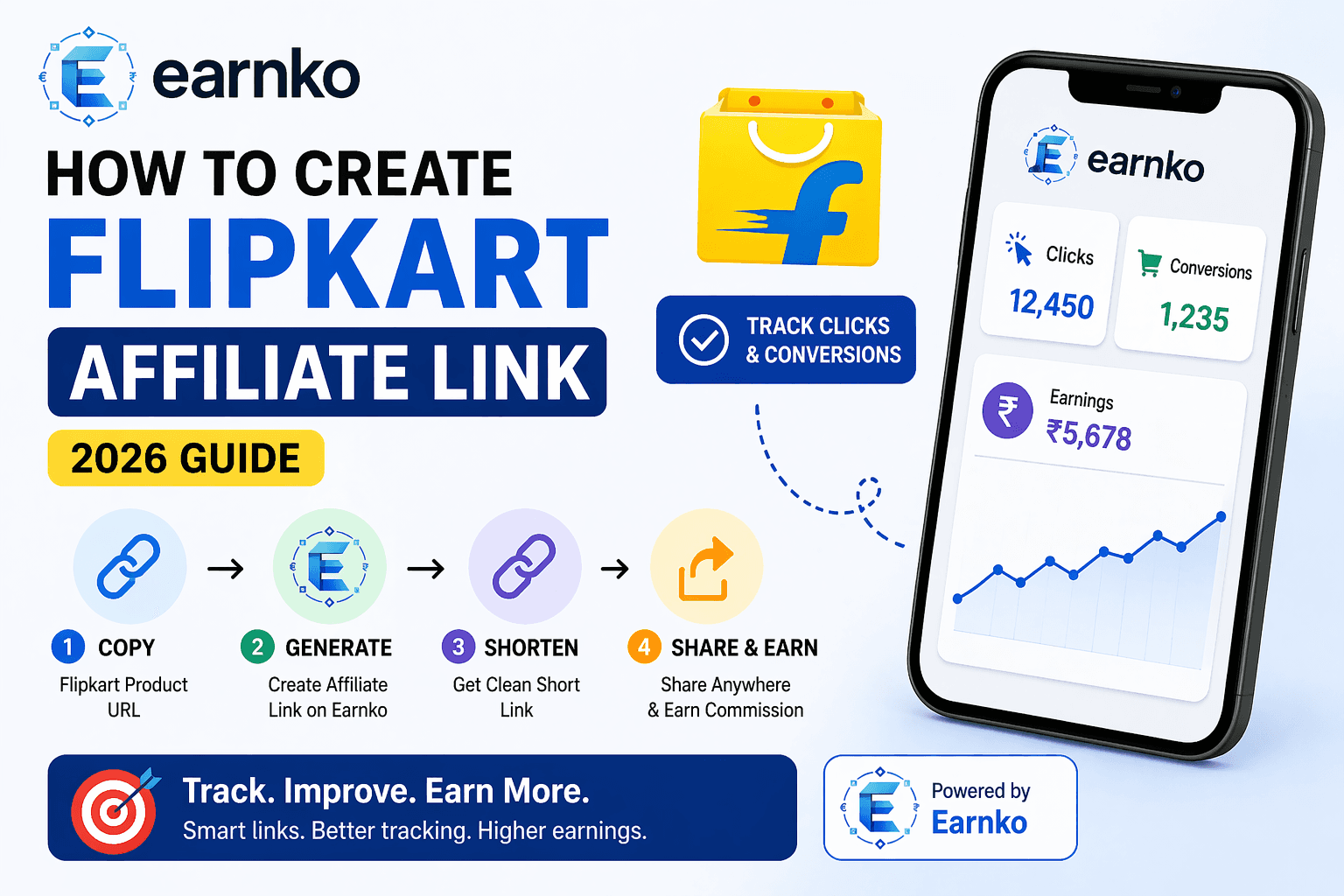
This guide explains the complete workflow using Earnko:
- Generate a Flipkart affiliate link in seconds
- Create a clean short link for better clicks (CTR)
- Track clicks and conversions from one dashboard
- Apply practical strategies to increase affiliate earnings
Quick start: generate a link here → /dashboard/affiliate
Explore supported brands → /stores
What Is a Flipkart Affiliate Link?
A Flipkart affiliate link is a trackable URL that includes affiliate attribution parameters (such as a click ID / sub ID). When a user clicks your link and completes an eligible purchase, the affiliate network can attribute the order to your account.
Normal link vs affiliate link (important)
- Normal Flipkart product URL: may not be attributed to you
- Affiliate link: includes tracking, so your clicks and conversions can be recorded
Why Use Earnko for Flipkart Affiliate Links?
Earnko is an affiliate link generator + tracking platform that helps you:
- Convert product URLs into trackable affiliate links
- Create short, share-friendly links (great for WhatsApp/Telegram)
- Track performance (clicks and conversions) in one place
- Optimize your content based on real numbers—not guesswork
Step-by-Step: Create a Flipkart Affiliate Link Using Earnko
Step 1: Copy the Flipkart product link
Open the Flipkart product page and copy the URL.
Best practice: always copy the product page, not the homepage. Product pages typically convert better.
Step 2: Open Earnko Link Generator
Go to /dashboard/affiliate and paste your product URL.
Step 3: Generate your affiliate link (with tracking)
Click Generate.
Behind the scenes, Earnko typically:
- Cleans and normalizes the pasted URL
- Resolves redirects (if the URL is shortened or redirected)
- Detects the store (Flipkart) to choose the correct network rules
- Creates tracking metadata for analytics
Step 4: Share the short link (recommended)
Short links are better for sharing because they are:
- cleaner and more trustworthy
- easier to paste in captions
- less likely to break in WhatsApp/Telegram formatting
- often higher CTR (click-through rate)
How Click Tracking and Conversion Tracking Works
Click Tracking (immediate)
When someone clicks your Earnko link:
- A click is recorded (unique click ID)
- The user is redirected through the tracking flow
- Flipkart opens
- Your click count updates in the dashboard
Conversion Tracking (usually delayed)
Conversions are not always instant because:
- orders can be cancelled or returned
- the merchant confirms the sale later
- affiliate networks send reports periodically
This is normal—affiliate marketing reporting often has a delay.
Best Practices to Increase Affiliate Earnings (Pro Tips)
1) Share high-intent content (not random links)
High-intent formats convert better:
- “Best deals under ₹999”
- “Price drop alert”
- “Limited stock”
- “Coupon applied price”
2) Use a strong CTA (call-to-action)
Examples:
- “Limited stock — order fast”
- “Price may change soon”
- “Deal ends tonight”
3) Post at peak hours
Try:
- morning: 8–11 AM
- evening: 7–11 PM
- weekends and major sale days
4) Avoid sending traffic to the homepage
Homepage/category pages convert lower than product pages.
5) Build trust before scale
If you post in Telegram/WhatsApp:
- don’t spam
- keep quality high
- add 1–2 lines of context (why this product is worth it)
Common Problems (and Fixes)
Problem: “Clicks are coming but conversions are zero”
Possible reasons:
- user didn’t complete purchase
- user cancelled/returned
- tracking window expired
- user used a competing coupon/affiliate source
- user switched device/app flow and attribution changed
Problem: “Link opens a different page”
Fix:
- ensure you pasted the correct product page URL
- try generating again using the clean product page URL
- avoid copying links that contain extra redirect layers
FAQ (SEO-Friendly)
Does Flipkart affiliate link work on mobile apps?
In many cases yes, but attribution depends on tracking rules, cookie/app behavior, and last-click attribution policies. Best practice: encourage users to purchase soon after clicking.
When will I receive commission?
Usually you will see the order status move through:
Pending → Approved / Rejected
Approval time depends on merchant/network policies.
Should I use a short link or full link?
For WhatsApp/Telegram/Instagram captions: short links usually perform better due to cleaner presentation.
Is Earnko free to use?
Check the current plan/features inside the platform. You can start by generating your first link in /dashboard/affiliate.
Next Steps (Internal Linking for SEO + Conversions)
- Generate your first Flipkart affiliate link: /dashboard/affiliate
- Browse supported merchants: /stores
- Read next: How affiliate tracking works (clicks, cookies, conversions) (make a post and interlink)
If you want consistent long-term growth, combine: SEO blog posts + Telegram/WhatsApp distribution + tracking-based optimization.